

For example, suppose you’re looking to build a house and are researching house plans. You find a design you love but want to see what it would be like to adjust the floor plan.
Instead of drawing out the floor plan from scratch, which is time-consuming, use our floor plan software that automatically converts 2D floor plan images to 3D floor plans that you can edit.
Here are the steps involved to automatically convert your 2D floor plan into a 3D floor plan.
Related: RoomSketcher Software Review | Planner 5D Software Review | Living Room Design Software Options | Space Designer 3D Software Review | DecorMatters App Review | Home Design Software Options
Step 1: Register for software
Register for the floor plan creator software for free.
Step 2: Go to the AI portal as follows
Click on your profile icon in the top right to pull down the menu. In the drop-down menu, click “Profile”.

Then click the “AI” option at the top as follows:

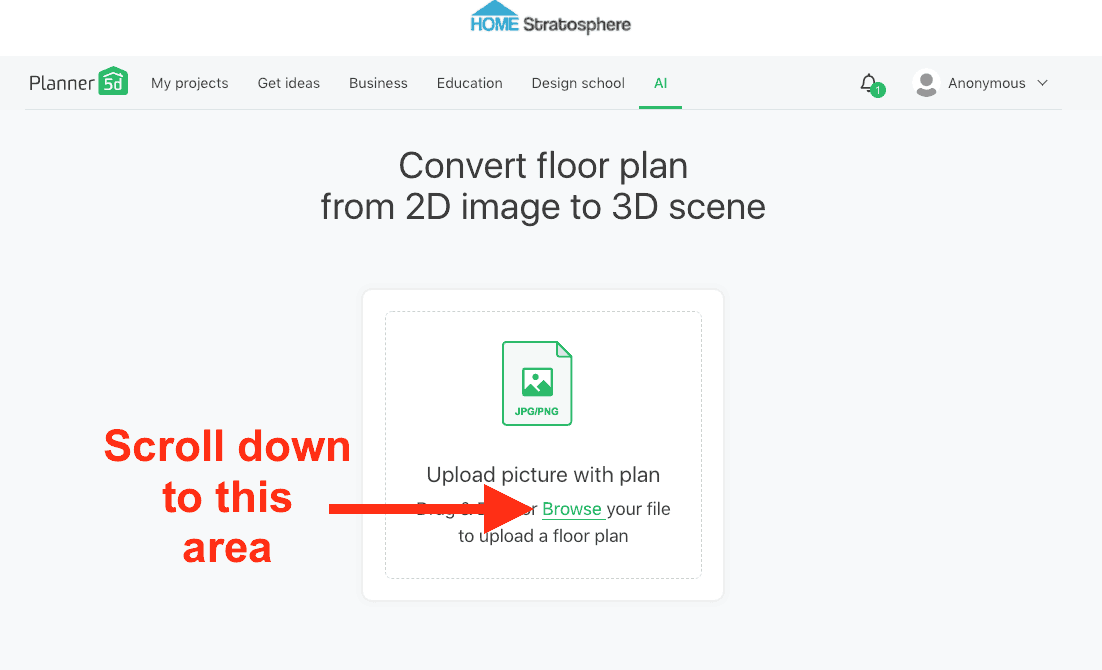
Step 3: Upload your 2D floor plan image (.jpg or .png only)
Scroll down until you see option to upload your 2D floor plan image as follows:
EXAMPLE: For this tutorial, I uploaded a 2D floor plan from Architectural Designs. Here it is.

Once uploaded, you’ll get the following notification:

Step 4: Check your email
IMPORTANT: It can take 30 minutes for the software to do the conversion. Don’t expect to receive the email instantly. For this example, we waited about 30 minutes until the email came through.
The email subject is “Your Plan Recognition Complete”.
Open the email and there’s a link to your converted 2D floor plan in the software account you registered.
When you click the link, you’ll be taken to the 2D version in the software. What’s great about this is you can now fully edit this floor plan.
Here’s the converted example from the above floor plan we uploaded:

NOTE: At this point you should save this as a new project so you don’t accidentally lose it.
At the top of this screen you can view it in “2D” or “3D”. If you click “3D”, this is what you get:

Again, it’s important to note that once this floor plan is in your account, you can fully edit it.
Step 5: Export your new design
Once you’re happy with your modifications, you can export your design.
That’s it. That’s all there is to converting a 2D floor plan image into an editable 3D floor plan.